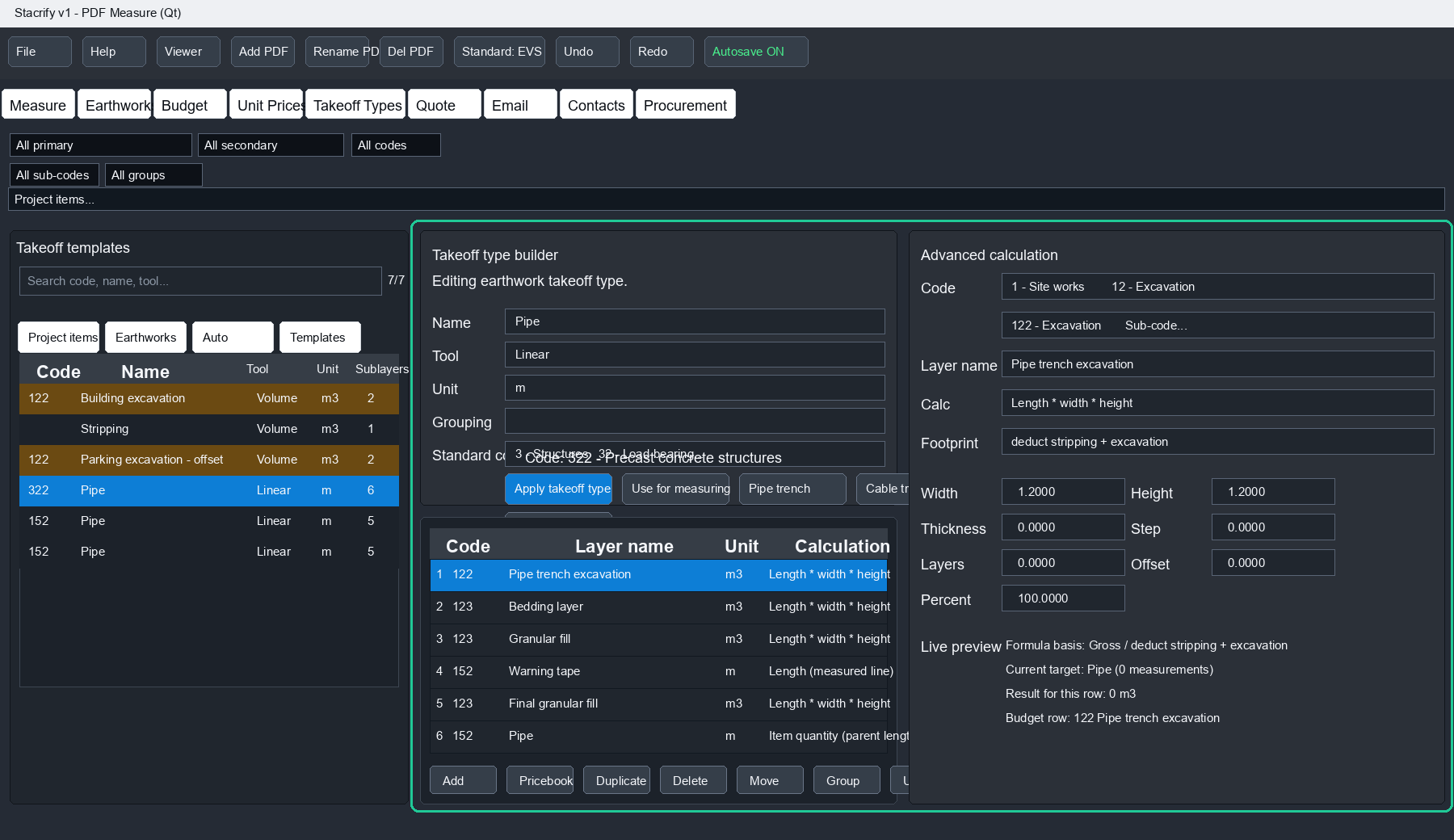
Open the PDF and create items
Build items manually, from templates or from construction types, then reuse the same setup for walls, finishes, openings, rooms and budget rows.
Automated PDF takeoff with a free browser viewer
Create rooms, wall quantities and finish layers from PDF drawings, build item-based budgets with your pricebook and standard codes, then share the result in a browser viewer that does not require STACRIFY desktop software.
The workflow
STACRIFY connects automated takeoff, reusable item creation, pricebook rules, standard codes and exported viewer files so the quantity logic can be checked without rebuilding it in another tool.
Build items manually, from templates or from construction types, then reuse the same setup for walls, finishes, openings, rooms and budget rows.
Auto Rooms, Auto Walls and Auto Finish Layers help convert PDF geometry into rooms, wall footprints, wall quantities and finish layer quantities.
Use sublayers, openings, cut-outs, wall footprints, pricebook rates and standard codes so gross, net and budget assumptions remain visible.
Export a viewer file so another person can open the takeoff in the browser, inspect items and review project or phase quantities.
What to emphasize
The desktop software creates and controls the quantities. The browser viewer makes the result easy to share. Pricebooks, standards and reusable items turn the takeoff into a budget workflow instead of a pile of coloured PDF markup.
Recipients can open exported STACRIFY viewer files in a browser, inspect measured items and review quantities without installing the desktop application.
Automation helps detect rooms, create wall footprints, generate walls and add finish layers around selected room-based geometry.
Items and sublayers can carry standard codes, formulas, comments and unit prices, producing a structured budget table from the same measured project.
Create items from measurement tools, takeoff templates, construction type build-ups or reusable item settings instead of rebuilding the same quantity logic every time.
Why try STACRIFY
STACRIFY is designed for users who need measured PDF quantities to become controlled budget rows, not only coloured shapes on a drawing. That connection is what helps reduce repeated quantity work after the estimate is created.
Measurements, sublayers, deductions, opening rows, comments, unit prices and totals can be reviewed in the same project instead of rebuilding the budget elsewhere.
Use Uniclass-style, ICMS-style or custom company hierarchies. The code structure can be adapted so the budget follows the way the project is estimated.
Phase areas can split the project into work stages, apartments, zones or packages, helping show material quantities for each selected area.
Users can open guides and visual examples for tools, sublayers, earthworks, openings, offsets, standards and Budget behaviour.
Estimating software alternative
STACRIFY is built for estimators and quantity surveyors who want PDF measurement to stay connected to construction codes, sublayers, net/gross logic and budget tables. It is a practical option to evaluate when searching for PDF takeoff software, construction estimating software or a takeoff workflow alternative.
Measure plans, facades, walls, openings, earthworks and cut-outs, then use the same project data for budget rows instead of rebuilding quantities manually.
Use standard codes, project and phase budgets, unit prices, comments, deductions and project totals in a workflow designed around estimating decisions.
Control which rows use gross or net quantities. Linked openings, wall footprints, cut-outs and earthwork overlaps can be shown as traceable deductions.
The built-in Help Center explains tools, sublayers, openings, earthworks and budget behaviour so estimators can test the software with their own standards.
For estimators and quantity surveyors
The goal is not only to draw coloured measurements on a PDF. STACRIFY is built to keep assumptions, deductions, codes and budget rows visible while the quantities are being created, so the result can be checked and reused later.
Budget comments can show opening, cut-out and earthwork net deductions, including overlapping excavations and road excavation effects.
Takeoff Types and sublayers help estimators reuse wall, floor, facade, trench and road build-ups instead of recreating formulas per item.
Projects are saved as a single .stac file with PDFs, measurements, standards, prices and settings together for easier handover and review.
Project Budget, Phase Budget and phase sublayers support estimating by apartment, zone, stage or work package without redrawing the same quantities.
Real PDF takeoff
STACRIFY is built for practical quantity takeoff from PDF plans, facades, sections and details. This example shows a facade measurement, openings placed inside that facade and the net quantity prepared for Budget.
Facade measurements stay connected to the openings placed on that facade, so the budget can show the gross area, opening deductions and the final net facade quantity separately.
The same workflow inside the app
These previews follow the real working order: set up the item or template, measure on the PDF, let sublayers calculate the quantities, then review the Budget result.
The measurement view keeps the PDF, tools, used items and budget impact close to the work area.
Budget rows can show what was deducted, joined or generated from sublayers, openings and cut-outs.
Major tools include guide content and visual examples, so users can learn how quantities are calculated and where the result appears in Budget.
One measurement, structured output
STACRIFY can turn one measured wall line into several controlled budget rows. Door and window openings can link to the wall, reduce selected net areas and create their own opening rows. Reveal rows are created only when the linked wall is configured with reveal/pale input.
Guided inside the software
STACRIFY Help is designed as a practical tutorial system. Users can select a topic, read the guide, open an interactive example and see how different choices affect quantities and budget rows.
Linear, Area, Wall, Facade, Count, Window, Door, Roof, Volume, Dimension and Cut-out workflows.
Footprints, offsets, slopes, openings, reveal/pale input, lintels, sills, sublayers and net-quantity deductions.
Explains which item or sublayer becomes a budget row, and why a parent item may not appear when its sublayers are budgeted instead.
Smart takeoff methods
Each area sublayer can define which wall types reduce its net area. This keeps wall footprint deductions clear and intentional.
Openings can deduct facade or wall quantities. Window and Door tools can also generate lintel and sill rows; reveal rows require the linked wall to have reveal/pale input enabled.
Bottom offset, slope angle and overlapping earthworks are handled as visible rules. STACRIFY can detect overlapping excavations and road excavation areas when calculating gross, deducted and net volumes.
Pipe and cable work can start from a measured route and use trench width, depth, bedding and backfill rules for quantities.
Standards and pricing
Select an existing classification, edit its hierarchy or create your own standard. The budget does not have to follow one fixed structure; it can follow the coding logic your project or company needs.
Editable classification hierarchy
STACRIFY can show the budget by parent groups, sub-groups and item rows. Users can select codes from a hierarchy, adapt that hierarchy or build a custom standard for company-specific estimating workflows.
This preview follows STACRIFY's budget layout: tabs, action buttons and table columns. The grouping example shows how a custom or Uniclass-style hierarchy can feed the rows.
Phase budgets and packages
A project budget gives the full quantity picture, but many projects also need phase or package quantities. STACRIFY can use phase areas to show which measured items and sublayers belong inside a selected part of the project.
Phase views are useful when the same measured project must be priced, ordered or reported by smaller work areas.
User-controlled quantity basis
STACRIFY does not force every budget row to use a net quantity. Users can decide whether the main item, each sublayer and each footprint rule should use gross or net quantities.
Wall and facade items can use gross quantity or selected net logic for their own budget row.
One sublayer can use gross area while another sublayer in the same item uses net area after openings or footprint deductions.
Sublayers can have their own height, thickness, layers, step, offset, formula and footprint setting instead of simply copying the main item.
The selected quantity basis changes the Budget rows immediately.
Annual software license
The first 49 annual licenses keep the 999 EUR renewal price for future renewals. After these licenses are sold, the standard annual license price is 1499 EUR.
49 discounted licenses are currently available.
Windows installer
Download the current Windows installer. A valid STACRIFY license is required to activate and use the software.
Windows or your browser may show a warning because this is a new unsigned installer. We are working on code signing. Only install STACRIFY from stacrify.com. By downloading or using STACRIFY, you agree to the license terms.
Get access
Contact STACRIFY to request license access, ask about pricing or arrange a product walkthrough.
We are also open to collaboration with construction companies, estimators, consultants, software partners and early users. If you would like to test STACRIFY, discuss a workflow, suggest an integration or explore partnership opportunities, contact us.